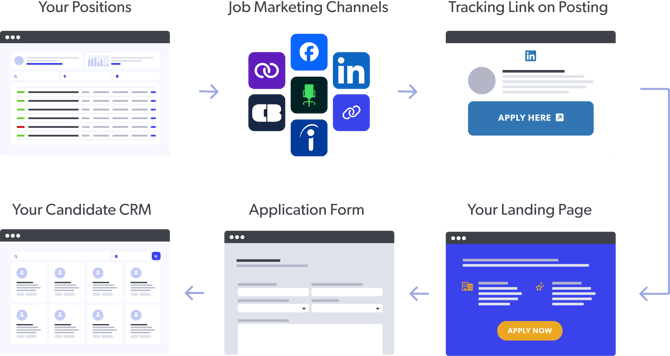
In the Leadline platform, a Position represents a job requisition + associated advertising, application, and automation rules for that job. In Leadline, a Position contains:
- Job requisition. The job details & description for the applicant pool.
- Application form. The application form used to submit an application to the pool.
- Advertising & tracking settings. How and where the position is promoted & tracked.
- Automation rules. The tags & associated workflow rules for viewing & analyzing the pool.
- Submissions. The candidates who submitted an application to the pool.
Why the term "Position"? It's more empowering when you're trying to promote retention-oriented recruiting practices. Read the post we wrote about it here.
Job Requisition
The job description for the applicant pool you are building. Includes properties like job title, description, requirements, and salary/benefits information. Can be mapped to a specific job-code in an ATS.
Application Settings
The application form used to submit an application to the pool. You can collect certain types of information from candidates including free text inputs, single or multiple choice selections, date entires, file uploads (e.g., a resume or cover letter) or video uploads (e.g., a virtual cover letter or media submission). You can also designate preferred answer choices in your application forms to fine-tune your scoring settings.
Advertising & Tracking
The Landing Page, Match Page and Not-a-Match Page templates used for advertising and qualifying for the pool. Also includes which channels the position is advertised to for source tracking purposes.
Automation rules
The workflow processes & tasks for this position which the software will conduct for you. This includes things like managing team member access, organizing the job for reporting purposes, interview scheduling settings, and sending SMS job updates.
Submissions
The candidates who submitted an application to the pool ("submissions"), their application form responses, and their status within the pool. This is the primary function used by hiring managers (users simply reviewing resumes, conducting first/second-level approval, etc.).
An overview of the position publishing process
Talent pools open & close based a variety of variables such as timing, budget, resource availability, and seasonality. In Leadline, you can publish and unpublish positions to reflect whether or not you are hiring for a job without interrupting progress or requiring you to start from scratch and "re-post" jobs in the future. When your position is "published", job advertising & tracking workflows are turned on, application forms can be submitted, and candidates can enter the pool. When it's off, the job is paused and your data is saved & retained for future use.
Visit our how to publish a position article if you are looking for help with publishing positions.
Pro-tip: Private job listings. You can close a job but leave it published to remove jobs from job board feeds but keep them open for others to apply using a channel link.
Page assignment
Personalizing the job-browsing experience as much as possible is important for increasing your candidate conversion rate. To do this, select a page template to be used for your position that best represents the employer branding for that applicant pool.
You can implement multiple templates and use them interchangeably with any of your jobs. For more instructions on how to setup a page, check out this guide on how to create Pages.
The (summarized) end-to-end Position Apply Process
To summarize everything in the above sections, here is a visual that summarizes what the logical candidate journey and workflow looks like for a job published through Leadline.