
As part of practicing better habits that increase speed to hire and speed to engage you can control how frequently Leadline alerts you when candidates submit applications to your open positions.
You can choose to be notified via email or have a text notification sent directly to your phone. In order for these notifications to be delivered, you need to input your email and phone number under the ‘My Profile’ section of the page.
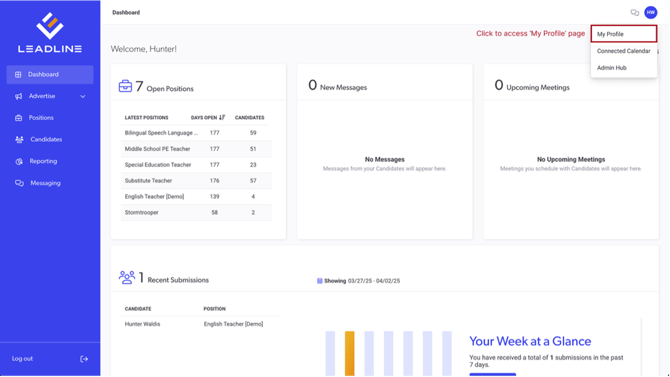
By default, the email address you used to log into the platform is where all email notifications will be sent to.
Heads up: If you change your email address in the ‘My Profile’ settings, that email will be used for both logging in and for email notifications
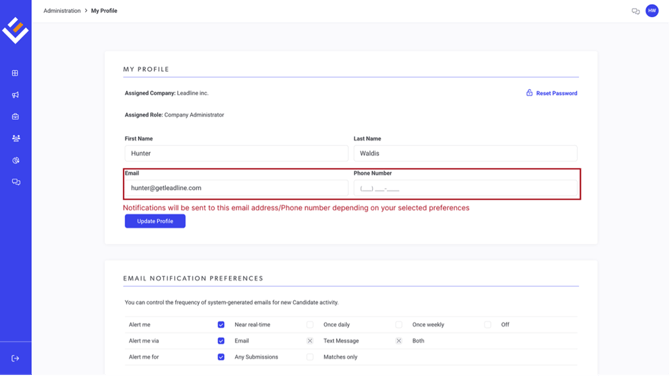
Types of Notifications
Email Notifications
The following table describes the information contained in each of the subscription types:
| Leadline setting | Email is triggered: | Email contains: | Recommended for: |
| Near real-time | Every time an application is submitted |
Position, Applicant Name, Applicant Score, Applicant Source |
Recruiters |
| Once Daily | Every day at 6:00pm est | How many applicants applied that day (and how many of them scored >50%) | Hiring Managers, Operational Reporting |
| Once Weekly | Every Friday at 6:00pm est | How many applicants applied that week (and how many of them scored >50%) | Administrators, Executive Stakeholders |
| Off | Never | N/A | Users who do not prefer email notifications. |
SMS Notifications
If you prefer to receive new candidate applications via a text message instead of an email, select 'Text message'.
Heads up: To avoid high volumes of SMS messages, only daily & weekly SMS notifications are supported.
Filtering Notifications
If you are in a high-volume recruiting role, you prefer to receive new candidate notifications in real-time. However, sometimes these notifications can get noisy when severely unqualified (junk) candidates are also creating notification noise for you.
You can setup your email notification preferences in Leadline to only alert you when a matched candidate applies. A matched candidate is one that submits an application and their application match score receives a 50% or greater.
Other Leadline Email Types
In addition to Leadline system notifications, we also send out a monthly product newsletter that includes new features, screenshots, upcoming roadmap features, and more. Be sure to subscribe to the product newsletter & announcements by clicking here.