
Leadline allows you to post jobs directly to your company's ZipRecruiter account.
With this integration enabled, job-seekers can search & discover jobs through the ZipRecruiter search experience, but are re-directed to a Leadline-powered experience when they start an application.
There are two significant benefits with this setup;
- Your company gets total control over your candidate's application experience
- Your company gets to centralize your candidate data in one spot (Leadline), instead of having candidate data in multiple places (ZipRecruiter, LinkedIn, Indeed, an email inbox, an Excel spreadsheet, etc.)
Pre-requisites
ZipRecruiter offers a self-serve interface to setup an XML feed, which makes it simpler to set up! All you need is two things;
- Your company must have an existing ZipRecruiter Employers. If you do not have an account, you can create an employer account in just a few minutes.
- You must setup a job feed in Leadline. To do this, head over to your Advertise > Job Feeder settings and click 'Get Started' on the option for ZipRecruiter.
Adding an XML Feed URL to your ZipRecruiter account
You can setup your own XML Feed URL on the Feed Import page. To finish setup;
- On the Advertise > Job Feeder settings page, click the 'Getting Started' button
- Click the 'Actions' menu, then select the 'View XML Feed URL' option
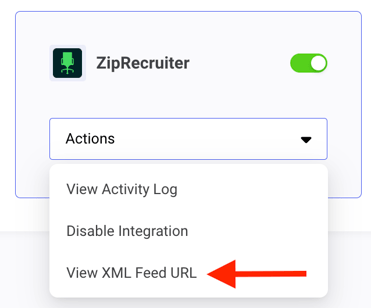
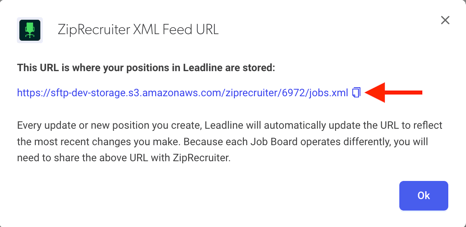
- Copy the URL displayed in Leadline
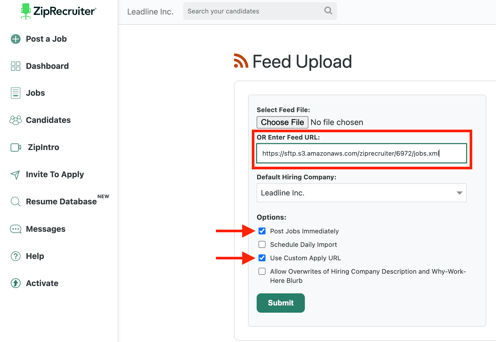
- Paste this URL into ZipRecruiter. Make sure the options for 'Post Jobs Immediately' and 'Use Custom Apply URL' are enabled.
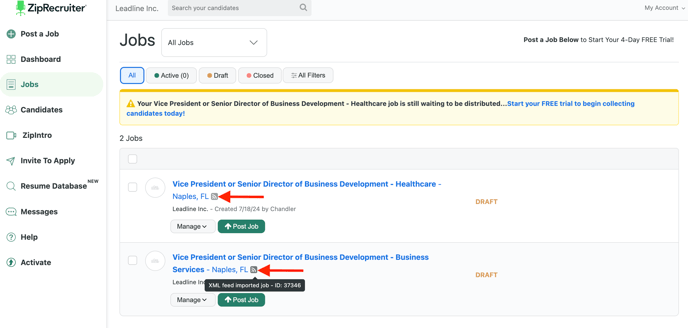
After clicking Submit, your jobs should be visible within a few minutes in ZipRecruiter. You will see them listed in the 'Jobs' section of the application, with an icon indicating the source of the job was an XML feed:
Frequently Asked Questions
"How does the ZipRecruiter job feed work?"
A job feed hosts all your active jobs, like a 'source of truth'. Every so often, ZipRecruiter will 'crawl' the feed to pull the latest job data into ZipRecruiter.
Every few hours, Leadline writes updates to this file based on your team's usage of Leadline. In parallel, every few hours ZipRecruiter 'crawls' this file. This is how Leadline communicates new jobs or updates to existing jobs to ZipRecruiter.
In Leadline, you can see when these 'sync' activities happen by clicking on 'View activity log' option (the same place you found your XML Feed URL).
"How long until my job posting in Leadline shows up on my ZipRecruiter page?"
ZipRecruiter syncs job data from Leadline every 6 hours (4x per day). This is a limitation imposed by ZipRecruiter on all Applicant Tracking Systems partners, including Leadline. Please allow up to 12 hours before the listing displays on Indeed.
"What if I use ZipRecruiter's paid job listings feature - can I continue to use those?"
Yes, Leadline does not replace your existing contract relationship with ZipRecruiter. Jobs synced from Leadline > ZipRecruiter are available in your Indeed dashboard if you would like to add some budget to those jobs/campaigns.