
Using LinkedIn's Job Wrapping feature, you can seamlessly post jobs from Leadline directly to your company's LinkedIn Recruiter account. When job-seekers click 'Apply' on those jobs in LinkedIn, they are re-directed to your Leadline-powered application experience.
⚠️ Heads-up ⚠️ Job Wrapping is only available to LinkedIn customers with a LinkedIn Recruiter account. Job Wrapping is not available to customers only using the 'Jobs' or 'Recruiter Lite' products.
Step 1: Set up a Job Feed in Leadline
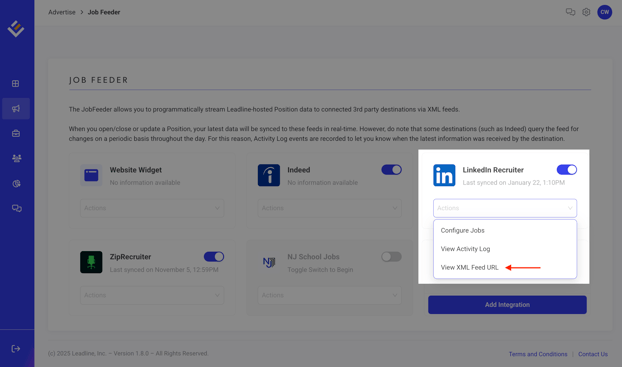
First, log-in to Leadline and head over to your Job Feeder settings and toggle on the option for LinkedIn Recruiter.
Once enabled, click on the 'Actions' drop-down menu item and select View XML Feed URL. Copy the URL presented to you, as you'll need to paste this into LinkedIn Recruiter in a moment.
Step 2: Connect your Job Feed to your LinkedIn Recruiter account
Log-in to your LinkedIn Recruiter account and follow the below steps (the latest can be found here in LinkedIn's documentation)
-
Move your cursor over your profile picture at the top of your Recruiter homepage and select Product settings from the dropdown.
-
Select Job posting under Company Settings.
-
Under the ATS Sources for Automated Job Postings section, click View/Edit and then click Add new ATS source.
-
Fill out the Request to connect ATS source slide-in window with the following information:
LinkedIn Recruiter Field Value to Enter ATS Leadline Job Source URL Paste the URL from Step 1 above here
For example:
sftp.leadline.io/linkedin/12345/jobs.xml
Company page on LinkedIn Your company's page where the jobs will be listed.
For example:
linkedin.com/company/YOURCOMPANYNAME/jobs
Applicant source tracking URL Not required, you can leave this field blank Additional information Not required, you can leave this field blank -
Click Add source.
Once connected, you will see jobs listed on your Company page on LinkedIn.
Frequently Asked Questions
"How does the LinkedIn Recruiter Job Feed work?"
A job feed hosts all your active jobs, like a 'source of truth'. Every so often, LinkedIn will 'crawl' the feed to pull the latest job data into LinkedIn.
Every few hours, Leadline writes updates to this file based on your team's usage of Leadline. In parallel, every few hours LinkedIn 'crawls' this file. This is how Leadline communicates new jobs or updates to existing jobs to LinkedIn.
In Leadline, you can see when these 'sync' activities happen by clicking on 'View activity log' option (the same place you found your XML Feed URL).
"How long until my job posting in Leadline shows up on my LinkedIn page?"
LinkedIn syncs job data from Leadline every 6 hours (4x per day). This is a limitation imposed by LinkedIn on all Applicant Tracking Systems partners, including Leadline. Please allow up to 12 hours before the listing displays on LinkedIn.
"What if I use LinkedIn's sponsored job listings - can I continue to use those?"
Yes, Leadline does not replace your existing contract relationship with LinkedIn. Jobs synced from Leadline > LinkedIn are available in your LinkedIn Recruiter dashboard if you would like to add some budget to those jobs/campaigns.
"Can I control which jobs are posted to LinkedIn?"
Yes, you can select which jobs from Leadline are sent to LinkedIn using the Configure Jobs action. Within your LinkedIn Recruiter dashboard, you can control which of the jobs synced from Leadline get budget put behind them for sponsored job postings.